


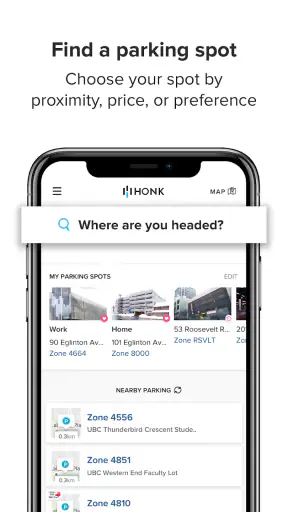
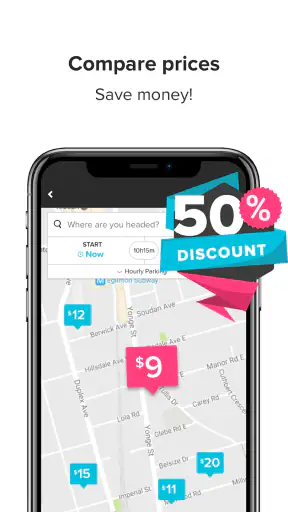
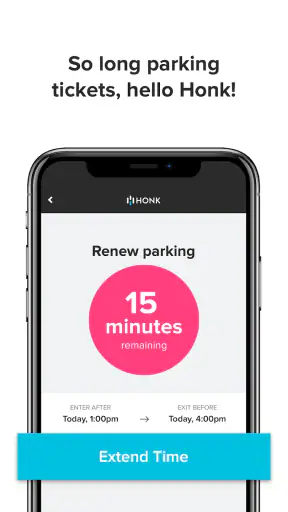
Parking apps are useful only when they reduce stress rather than add another problem at the curb. I approached HonkMobile with that standard: can it make a normal parking session easier, and can I understand what I am agreeing to while using it? It is a free Maps & Navigation app from HonkMobile, aimed at searching for parking, locating a suitable space, and paying through the phone instead of relying on a traditional meter.
That basic idea is practical, especially when I am driving somewhere unfamiliar and do not want to stand beside a machine reading small instructions. At the same time, a parking payment app sits in a sensitive part of everyday life. It may be used when I am in a hurry, entering a vehicle area, checking a location, or handling a payment. My opinion is therefore less about flashy extras and more about whether the workflow feels clear, whether I remain in control, and whether I can avoid mistakes.
How HonkMobile fits into real parking trips
The app has been available since February 4, 2014, and its current version is 6.18.1. That long presence matters to me because parking services are most useful when they are dependable during ordinary, unglamorous moments: arriving at a medical appointment, meeting someone downtown, attending an event, or stopping briefly near a busy shopping area. It is not an app I would open for entertainment. Its value appears when it helps me move from “Where can I park?” to “I have paid correctly” with as little hesitation as possible.
HonkMobile has reached more than a million installs and holds a 4.4 average from roughly seven and a half thousand ratings. Those figures suggest that many people find the concept worthwhile, but they do not remove the need for personal checking. Parking rules differ from one location to another, and a smooth app screen cannot guarantee that a space is legal, available, or appropriate for a particular vehicle. I still treat signs, curb markings, time limits, and local instructions as the final authority.
The app is rated Everyone, and it requires Android 5.1 or later on compatible Android devices. That makes it accessible to people using a wide range of phones, although compatibility is still something I would check before a trip rather than after arriving at a full car park. The price is free, which lowers the barrier to trying it, but “free” does not mean I should rush through payment screens or skip checking the final parking details.
What I would do before relying on it
My preferred routine is to install and open the app before I am already circling a crowded street. I would sign in, review the available account and payment choices, and become familiar with the location search before needing it. This is a small but important trust habit: a parking app is easiest to judge when I am calm, not when traffic is behind me and a sign says I must pay immediately.
I would also check whether the intended destination is represented in the app before setting off. A service can be useful in one city or parking facility and less useful in another. If the location does not appear, or if the instructions on the ground direct drivers to a different payment method, I would follow the local instructions rather than trying to force the app into the situation.
When a location does appear, I would compare the app’s information with the physical signs. I pay particular attention to the zone or location identifier, permitted hours, maximum stay, and any restrictions. Entering the wrong nearby area is one of the most realistic ways to turn a convenient payment workflow into a ticket, so I do not rely on a map pin alone.
Trust starts with visible choices
My trust in a parking app comes from visible user choices rather than from the app’s name or age. Before confirming anything, I want to see what location I selected, how long I am paying for, what amount is being charged, and which payment method is being used. If any of those details are hidden behind several screens, I slow down. The best workflow is not merely fast; it is easy to audit at the exact moment when an error would matter.
I also look for clear account controls. Useful controls include the ability to review saved payment details, manage a vehicle or profile, sign out, and change information without having to guess where the setting lives. I do not assume that a control exists simply because it would be convenient. Instead, I judge the app by what it visibly lets me inspect and edit during use.
This is especially important when more than one person uses the same phone or vehicle. I would not casually leave an account open on a shared device, and I would check the active profile before paying. A family member borrowing the phone, a work vehicle used by different drivers, or a rental car can all create confusion if the wrong vehicle or account is selected.
The moments when data deserves extra attention
Parking naturally involves information that can feel personal: a location, a time, a vehicle, and a payment action. I do not treat those details as harmless just because the transaction is small. My approach is to read the visible prompts, permissions, and privacy choices when they appear, and to grant only what is needed for the task I am trying to complete. I avoid accepting a broad prompt automatically when the app gives me a meaningful choice.
Location access deserves particular care. Searching for parking may be easier when the app can use my position, but I prefer to understand whether I can search manually or use the app with a more limited location choice. If I am browsing parking before leaving home, I may not want the same location behavior as when I am standing beside the destination. That distinction helps me keep control over when location information is relevant.
I also pay attention to notifications. A reminder about an active parking session can be useful, but I do not treat a notification as a substitute for checking the actual end time or local rules. If I am finished earlier than expected, I look for the appropriate visible option in the session rather than assuming that closing the app ends anything. If I extend a stay, I confirm the new duration and charge before leaving the screen.
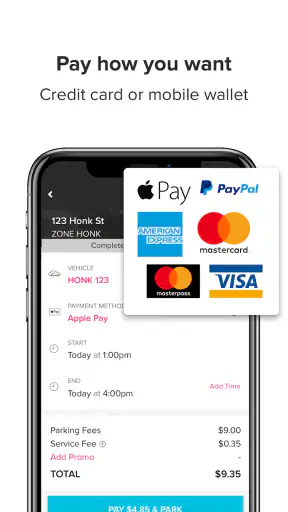
Payment is another point where I slow down. I check the selected vehicle, location, duration, and total before confirming. I would not save a payment method on a device I do not control, and I would review the account after a failed or interrupted transaction instead of immediately trying again several times. Duplicate attempts are an avoidable risk whenever a connection is slow and the first result is unclear.
A realistic everyday session
Imagine I am driving to a busy appointment and arrive with only a short window to park. I would first stop safely, read the nearby sign, and identify the exact area rather than searching while moving. In HonkMobile, I would search for the destination or use the available location tools, compare the result with the sign, and select the matching parking area. Before paying, I would check the vehicle and the intended stay.
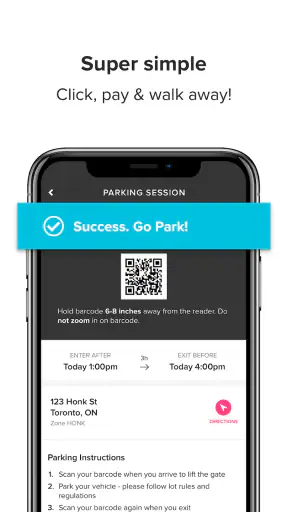
Once the session is active, I would keep the confirmation available until I am satisfied that the transaction went through. I would note the end time instead of trusting my memory, particularly if the appointment may run late. If the app presents a way to extend the session, I would use it before the original period expires, but I would still verify that the extension applies to the correct location and vehicle.
That workflow shows the app’s real strength: it can put searching and payment in one place. Its weakness is equally clear: the driver remains responsible for matching digital information with the physical parking rules. The app can simplify the payment step, but it cannot replace attention at the curb.
Where it is better than a meter, and where it is not
Compared with a traditional parking meter, the phone-based approach can be more convenient when I need to avoid coins, return to the vehicle later, or manage a session without standing at a machine. It may also make a busy arrival less awkward because I can handle the payment from the phone rather than searching for a working meter.
Compared with a general map application, HonkMobile is more focused on the parking transaction itself. A map may be better for broad route planning, walking directions, or exploring nearby businesses, while this app makes more sense when my immediate goal is to identify a supported parking area and pay for it. I would happily use both: a general map for the journey and HonkMobile for the parking task when the destination is supported.
A physical meter or facility-specific method can still be the better option in several situations. If my phone battery is nearly empty, mobile connectivity is unreliable, or the signs clearly instruct me to use another payment channel, I would not depend on an app. The same applies when I need a receipt format, permit handling, or accessibility arrangement that the visible workflow does not clearly support. Convenience is valuable, but a familiar local method can be safer when conditions are unusual.
Small habits that prevent expensive mistakes
- Match the location code, not just the street name. Nearby parking areas can look similar in a search result, while the sign beside the vehicle usually identifies the exact area.
- Check the vehicle before confirming. This matters when I have more than one vehicle in the account or when another driver has recently used the phone.
- Keep the end time visible in my plan. I do not assume that a reminder will arrive at the perfect moment, especially during an appointment or event.
- Recheck after a connection problem. I look for a clear confirmation before starting another payment attempt, reducing the chance of paying twice.
- Review choices when privacy matters. I use the least intrusive location and notification options that still let me complete the parking task comfortably.
These habits are not glamorous, but they are where I get the most value from the app. The important skill is not tapping quickly. It is creating a repeatable check before payment and another check after payment. That approach makes the service more dependable without pretending that technology removes every parking risk.
Who will appreciate it most
I think HonkMobile is a good fit for drivers who regularly park in supported areas and dislike carrying coins or searching for a meter. It is also useful for people who want a single phone-based workflow for finding a parking option and paying, particularly when they are visiting an unfamiliar part of town. Occasional drivers can benefit too, provided they test the app before an important trip.
The app is less suitable for someone who rarely uses smartphone payments, keeps the phone offline, or prefers not to connect parking activity with an account and payment process. It may also frustrate drivers who expect every car park or curbside space to appear automatically. For those users, a local meter, a facility’s own method, or a general map paired with on-site payment may be simpler.
I would be cautious about recommending it as the only plan for a long journey. A charger, a backup payment method, and attention to the physical signs are sensible companions. If the phone is lost, the battery fails, or the network becomes unreliable, the convenience of a digital parking session can disappear at exactly the wrong time.
My cautious verdict
After looking at the app as both a parking tool and a service that handles sensitive choices, I see a useful, focused product rather than a complete answer to every parking situation. HonkMobile can make the transition from searching to paying more manageable, and its free access makes it reasonable to try where it is supported. Its 4.4 average and more than a million installs show that it has earned substantial user attention, though I still recommend judging it against the places I personally park.
My recommendation is conditional but positive: try it before a busy trip, learn the account and payment controls, compare every result with the signs, and keep a backup for battery or connectivity problems. I would use it when the location is clearly supported and the app gives me enough visible information to confirm the transaction confidently. I would skip it when the local instructions point elsewhere or when I cannot verify the active session.
The most trustworthy way to use HonkMobile is as a convenience layer, not as a replacement for judgment. When I keep control of the location, duration, vehicle, payment, and privacy choices, it can remove an annoying part of parking without asking me to ignore the details that matter.


